How to Configure Kepware IoT Gateway: MQTT, AWS IoT Core and Azure IoT Hub


The Kepware IoT Gateway plug-in publishes plant-floor data to any MQTT broker or REST endpoint, including AWS IoT Core and Azure IoT Hub. Setup takes minutes once you know the platform-specific rules: X.509 certificates for AWS, SAS tokens and strict field formatting for Azure. Here is the exact configuration for each, plus the architecture patterns that hold up in production.
What is Kepware IoT Gateway?
Kepware IoT Gateway is an advanced plug-in for Kepware Server (formerly KEPServerEX) that streams real-time tag data to IT and cloud systems over MQTT and HTTP/REST. It converts data collected by 150+ drivers for industrial protocols, from PLCs, PACs, RTUs, flow computers and OPC servers, into JSON. The plug-in installs together with Kepware Server on the same machine. One prerequisite catches people out: the gateway service requires a 32-bit Java 21 runtime (JRE or OpenJDK) on Windows, and a missing JRE is the most common reason a freshly installed IoT Gateway fails to start.
Typical downstream use cases include real-time dashboards and data visualisation, analytics and machine learning models, condition monitoring that prevents unplanned downtime, and compliance reporting. In effect it is a software industrial IoT gateway: it performs the protocol translation role of a hardware IIoT gateway inside the server itself, with no additional edge device required.
It provides three agent types:
| Agent | Direction | Typical use |
|---|---|---|
| MQTT Client | Publishes to a broker | AWS IoT Core, Azure IoT Hub, Mosquitto, HiveMQ |
| REST Client | Pushes via HTTP POST/PUT | Web services, databases, custom APIs |
| REST Server | Exposes an HTTP endpoint | MES or dashboards polling Kepware |
What matters in practice: publish rates from 10 ms to once per 27.77 hours, per-tag deadbanding (a direct lever on cloud ingestion costs), publishing either at set intervals or only when a tag value changes, multiple simultaneous agents and client connections, TLS on all agents, and remote setup through the Configuration API. Licensing is a subscription sized by tag count; see our guide to perpetual vs subscription licensing.
One constraint to plan around: the MQTT agent publishes tag data as a bulk JSON payload to one topic. It does not publish each tag to its own topic. If you need a per-tag hierarchy, for example for a Unified Namespace, transform at the broker.
The IoT Gateway is platform-agnostic: any cloud platform that accepts MQTT or REST works. In practice AWS IoT Core and Azure IoT Hub are the two hyperscaler targets, since Google Cloud IoT Core was retired in 2023.
New to the platform? Start with the Kepware connectivity platform overview and the full list of Kepware drivers.
Kepware MQTT Configuration (Sparkplug B)
- In the Configuration tool, right-click IoT Gateway > New Agent, select MQTT Client.
- Enter the broker URL: tcp://broker:1883 or ssl://broker:8883 for TLS. No trailing slash, or the agent silently fails to connect. For TLS connections set the agent’s TLS Version explicitly to v1.2 (required by AWS and Azure); the Default option picks a version based on the installed JVM.
- Set the Topic, QoS 1 for telemetry, and a unique Client ID. Two clients sharing an ID will keep disconnecting each other.
- Right-click the agent, add IoT Items, set scan rates and enable Only on Data Changes with a deadband. The default scan rate is 10000 ms per tag; lower it only where the process genuinely needs faster data, since every reduction multiplies traffic and ingestion cost.
- Verify in the Event Log, then subscribe with MQTT Explorer or mosquitto_sub to confirm the JSON payload arrives. Each item carries the tag value, quality flag and timestamp.
Where Sparkplug B fits. The IoT Gateway sends JSON, not native Sparkplug B. If your architecture requires Sparkplug-compliant publishing, route Kepware’s JSON through an edge broker such as HiveMQ Edge and transform there. Decide this at design time, not during commissioning.
Connecting Kepware to AWS IoT Core
AWS offers several services that can be used to acquire data from Kepware, including the aforementioned AWS IoT Core, AWS IoT SiteWise, and AWS IoT Greengrass. Choosing the right one depends on your current architecture and communication strategy – that is, the features you need. If you need assistance selecting the right architecture, we’re happy to help.
AWS authenticates with X.509 certificates, which the IoT Gateway supports directly. No intermediary software needed.
- In the AWS IoT console, create a Thing, generate a device certificate and download the certificate, private key and Amazon Root CA.
- Attach an IoT policy allowing iot:Connect and iot:Publish on your topic.
- In the Kepware Administration utility, go to Settings > IoT Gateway > Manage Certificates and import the client certificate and key.
- Configure the agent (topic and client ID exactly as permitted by the policy):
ssl://xxxxxxxx-ats.iot.eu-central-1.amazonaws.com:8883 - Test with the MQTT test client in the AWS console.
The two most common failures are a policy that does not cover the exact topic string and a client ID mismatch. Both look identical from Kepware, so check AWS CloudWatch for the authoritative error.
Connecting Kepware to Azure IoT Hub
Azure also offers several services that can be used to acquire data from Kepware—Azure IoT Hub, Event Grid, and IoT Operations. As with AWS, the choice depends on the specific situation; each service has its advantages and disadvantages. We’re also happy to help you choose the right service.
Microsoft Azure IoT Hub enforces strict formatting on three MQTT fields. Any deviation returns Not authorized to connect, the single most common Kepware-to-Azure error.
- Register a device in IoT Hub and note the Device ID and hostname (yourhub.azure-devices.net).
- Generate a SAS token: az iot hub generate-sas-token -d {device_id} -n {hub_name} –duration 31536000. Diarise the renewal; an expired token silently stops data flow.
- Configure the agent exactly as follows:
| Kepware field | Required value |
|---|---|
| Client ID | Identical to the Device ID, character for character |
| Username | {hostname}/{device_id}/?api-version=2021-04-12 |
| Password | Full SAS token, single line, no trailing spaces |
| URL | ssl://{hostname}:8883 |
| Topic | devices/{device_id}/messages/events/ (trailing slash required) |
If the connection is rejected after successful TLS: verify the client ID equals the device ID, the username includes the api-version suffix, the token has not expired (se= epoch), and the token’s resource URI matches hostname and device ID casing exactly. Still stuck? Connect with MQTT Explorer using the same credentials. If that fails too, the problem is in Azure, not Kepware.
Kepware OPC UA PubSub
Kepware Server exposes tags through a classic OPC UA client/server interface: stateful sessions, ideal for deterministic plant-floor integration (how OPC UA works).
Kepware does not act as a native OPC UA PubSub publisher. The proven split: keep SCADA and MES on Kepware’s OPC UA server locally, and use the IoT Gateway for the northbound MQTT stream. Both run in parallel from the same tag space. If your enterprise mandates PubSub end to end, place a PubSub-capable aggregating node between Kepware and the broker.
Kepware Cloud Gateway Architecture Patterns
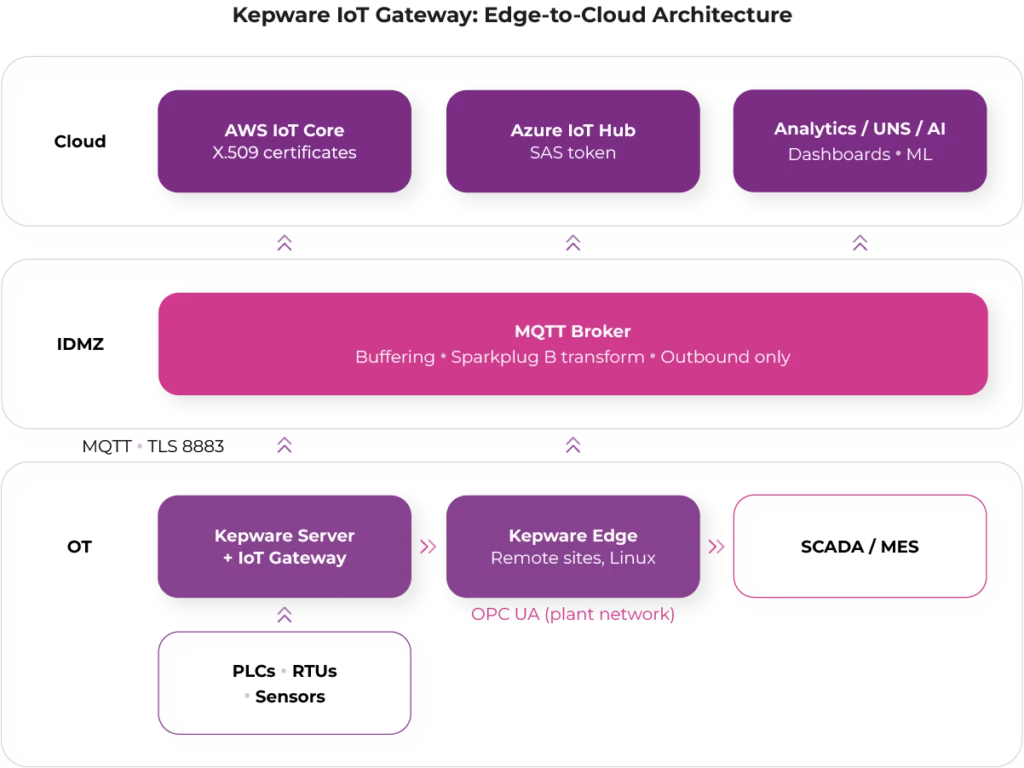
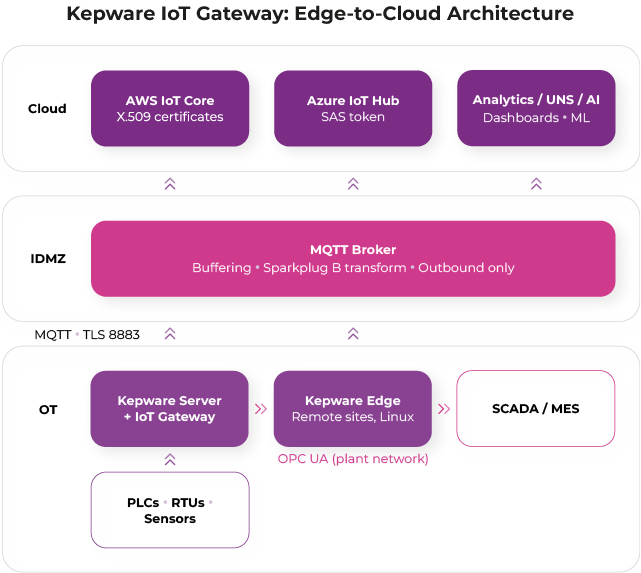
1. Direct edge-to-cloud. PLC → Kepware Server → IoT Gateway → AWS/Azure. Simplest topology, best for single sites and pilots. Weakness: every new consumer needs another agent, and a WAN outage means data loss.
2. Local broker and cloud bridge. Kepware publishes once to an on-premises broker (Mosquitto, HiveMQ, EMQX), which bridges to the cloud and serves local subscribers. Decouples producers from consumers, buffers through outages, and is the stepping stone to a Unified Namespace. Sparkplug B transformation happens here.
3. Segmented DMZ. For IEC 62443 and NIS2 alignment: Kepware publishes outbound-only into a broker in the industrial DMZ, one open port (8883), nothing in the cloud can initiate a connection into the control network.
4. Hybrid with Kepware Edge. Since the 2025 release, Kepware Edge runs connectivity in Linux containers, managed alongside Windows-based Kepware Server through Kepware+ Manager. Edge for distributed sites, Server at main plants, both feeding a common broker layer.
The MQTT Client driver decodes Sparkplug B when subscribing. The IoT Gateway publishes JSON, so Sparkplug-compliant publishing requires a transforming broker.
Need IoT Gateway setup? TTPSC can help
Configuring one agent is easy. Designing a secure, scalable edge-to-cloud architecture across sites, brokers and clouds is where projects stall. As a Velotic Authorized Reseller and certified system integrator, TT PSC handles licensing, architecture design, deployment and managed support. We are also an AWS Partner and Microsoft Solutions Partner, so the same team covers both ends of the pipeline: the Kepware layer on the plant floor and the cloud landing zone it publishes into.