Kepware Drivers List: The Complete Guide to Every Protocol and Connection


Kepware offers over 150 certified communication drivers covering Modbus, EtherNet/IP, OPC UA, Siemens S7, Allen-Bradley, and MQTT – providing access to thousands of industrial devices from a single platform. The unified OPC UA output delivers data to SCADA, MES, ERP, and cloud systems regardless of the underlying protocol. This guide covers the full driver catalogue, configuration, licensing including the Kepware+ enterprise subscription and troubleshooting, from the perspective of a European system integrator with over a decade of Kepware deployment experience.
Introduction to Kepware
Kepware is a portfolio of industrial connectivity solutions. Designed for manufacturing, utilities, building automation, and process industries, Kepware’s solutions deliver real-time data access and seamless protocol conversion. Kepware Server (the Windows-based platform formerly known as KEPServerEX) connects to virtually any industrial device using 150+ pre-built drivers and exposes standardised data via OPC UA, OPC DA, MQTT, and REST interfaces. Kepware Edge extends the same connectivity to Linux-based containerised environments for rapid scaling and lower operational overhead. Kepware+ Manager provides a secure SaaS control plane for remotely viewing and managing all Kepware deployments across the enterprise from a single interface.
What Are Kepware Drivers?
A Kepware driver is a plug-in that translates native device protocols into the standardised OPC UA interface.
Each driver in Kepware is responsible for communicating with a specific group of industrial devices, OPC servers or client applications used in the manufacturing industry. It acts as a translator that manages the connection and ensures that data from machines is correctly read, interpreted, and passed on to higher‑level systems.
From a technical perspective, drivers run inside the Kepware Server runtime and handle a whole „data access” part: protocol negotiation, connection management, and data‑type translation required to communicate with a specific group of industrial devices. Drivers can be licensed individually or as part of manufacturer‑specific suites, such as the Siemens Suite or Allen‑Bradley Suite, and they can be freely combined within a single Kepware Server instance.
For organisations in the manufacturing industry that want to eliminate driver‑selection and licensing complexity entirely, the Kepware+ enterprise subscription bundles all available drivers into a single annual fee, simplifying deployment, scaling, and long‑term maintenance.
Architecture: Channel, Device, Tag
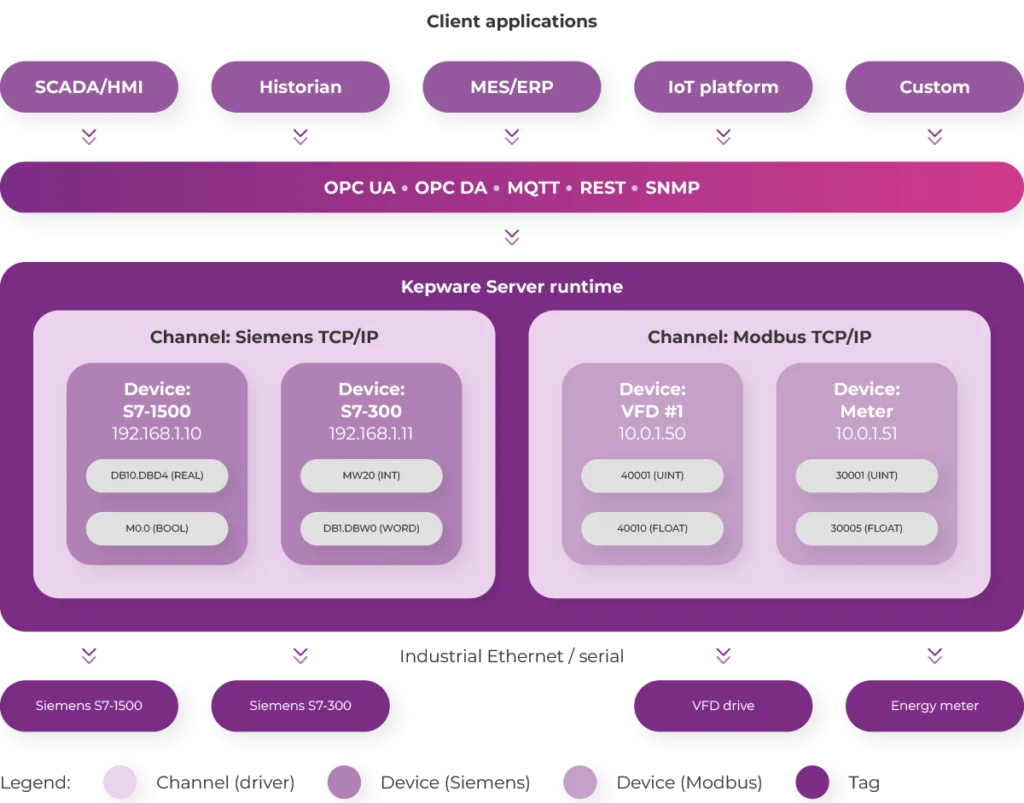
Every driver follows the same operational pattern. You create a channel that references the driver and defines the transport layer (Ethernet, serial, or encapsulated serial-over-Ethernet). Within the channel, you create one or more devices, each with its own IP address or node ID, polling rate, and tag list. Tags are the individual data points – register addresses, symbolic names, or protocol-specific objects – that client applications consume via OPC UA, OPC DA, MQTT, or REST.
How Kepware Bridges OT and IT via OPC UA
Because all drivers share the same configuration interface and runtime engine, adding a new protocol to an existing project is straightforward: install the driver license, create a new channel, and configure your devices. Kepware Server handles multiplexing, block-read optimisation, and client session management across all active drivers simultaneously. Every tag from every driver is automatically exposed through Kepware Server’s built-in OPC server interface – creating a single, unified namespace that any OPC client application (SCADA, MES, historian, cloud platform) can consume without driver-specific configuration.
Full List of Kepware Protocols and Drivers (150+)
Kepware supports 150+ certified drivers covering PLC vendors, open protocols, OPC standards, and IIoT/Cloud connectivity.
The table below provides a master reference of major Kepware driver families organised by category. Each driver is available as an individual licence, as part of a Communication Suite, or included automatically with a Kepware+ enterprise subscription.
| Category | Protocol / Driver | Supported Devices | Suite |
|---|---|---|---|
| PLC – Siemens | Siemens TCP/IP Ethernet | S7-200, S7-300, S7-400, S7-1200 | Siemens Suite |
| PLC – Siemens | Siemens S7 Plus Ethernet | S7-1200, S7-1500 (symbolic) | Siemens Plus Suite |
| PLC -Siemens | Siemens TCP/IP Server (Unsolicited) | S7-300/400 push model | Siemens Suite |
| PLC – Allen-Bradley | ControlLogix Ethernet (EtherNet/IP) | ControlLogix, CompactLogix, GuardLogix | Allen-Bradley Suite |
| PLC – Allen-Bradley | PLC-5 / SLC-500 Ethernet | PLC-5, SLC-500 | Allen-Bradley Suite |
| PLC – Allen-Bradley | DF1 Serial / DH+ Serial | PLC-5, SLC-500, MicroLogix (serial) | Allen-Bradley Suite |
| PLC – Allen-Bradley | Micro800 Ethernet | Micro810/820/830/850 | Allen-Bradley Suite |
| PLC – Schneider | Modbus TCP / Modbus Plus / Unity | M340, M580, Premium, Quantum | Schneider Suite |
| PLC – Mitsubishi | MC Protocol Ethernet / Serial | MELSEC-Q, iQ-R, FX series | Mitsubishi Suite |
| PLC – Omron | FINS Ethernet / Serial | CJ, CS, CP, NJ/NX series | Omron Suite |
| PLC – GE | EGD / SNP / SNPX / CCM | PACSystems RX3i/RX7i, Series 90 | GE Suite |
| CNC – Fanuc | Focas Ethernet / HSSB | Series 0i, 16i–35i | Fanuc Suite |
| Open Protocol | Modbus TCP/IP Ethernet | Any Modbus TCP device | Modbus Suite |
| Open Protocol | Modbus RTU / ASCII Serial | RS-232/485 Modbus devices | Modbus Suite |
| Open Protocol | EtherNet/IP (CIP) | Any EtherNet/IP device (non-AB) | Manufacturing Suite |
| Open Protocol | PROFINET IO Controller | PROFINET IO devices (GSDML) | Manufacturing Suite |
| OPC | OPC DA Client | Third-party OPC DA servers | OPC Connectivity Suite |
| OPC | OPC UA Client | Third-party OPC UA servers, S7-1500 UA | OPC Connectivity Suite |
| IIoT / Cloud | MQTT Client | MQTT brokers, IIoT sensors | IoT Gateway |
| IIoT / Cloud | Sparkplug B | Eclipse Sparkplug B hosts/devices | IoT Gateway |
| Utilities | DNP3 Master (Ethernet / Serial) | Outstations, RTUs, smart meters | Power Suite |
| Utilities | IEC 60870-5-101/104 | Telecontrol outstations (EU grid) | Power Suite |
| Utilities | IEC 61850 | Substation automation, IED communication | Power Suite |
| Building | BACnet/IP | HVAC, lighting, access control | Building Automation Suite |
| IT / Network | SNMP | Switches, routers, UPS, sensors | IT Suite |
Additional drivers not listed above include Honeywell HC900/UDC, Yokogawa, Beckhoff TwinCAT, AutomationDirect, Aromat, Toshiba, Toyopuc, and the System Monitor driver for Windows host metrics. The User Configurable (U-CON) driver provides a generic framework for custom serial or TCP protocols without programming.
Siemens S7 Driver
Kepware covers the full S7 range from legacy S7-200 to current S7-1500 with dedicated drivers.
Siemens PLCs are among the most widely deployed controllers in European and global manufacturing industry. Kepware’s Siemens driver portfolio is available individually, as part of the Siemens Suite or Siemens Plus Suite, or included in the Kepware+ enterprise subscription.
Siemens TCP/IP Ethernet Driver
This is the workhorse driver for S7 communication. It connects directly to S7-200, S7-300, S7-400, and S7-1200 PLCs over TCP/IP using a standard network interface – no additional middleware or Siemens software libraries required. The driver supports PG, OP, and PC link types, and works with CP-243, CP-343, and CP-443 communication processors. Automatic Tag Generation (ATG) from TIA Portal projects is supported for S7-300, S7-400, S7-1200, and S7-1500 devices via the TIA Portal Exporter utility. Key capabilities include block read/write optimisation for high-speed data acquisition, support for the low-cost netLink adapter (MPI-to-Ethernet conversion), and 64-bit data type support.
Siemens S7 Plus Ethernet Driver
The S7 Plus driver provides native symbolic access to S7-1200 and S7-1500 controllers using the S7 Comm Plus protocol. Unlike the TCP/IP Ethernet driver, which uses absolute addressing (e.g., DB10.DBD4), the S7 Plus driver reads and writes using the symbolic tag names defined in TIA Portal. This eliminates manual address mapping and supports optimised data blocks – a critical requirement for S7-1200 (firmware >= 4.0) and S7-1500 projects where optimised block access is enabled by default. The driver features online Automatic Tag Generation directly from the PLC, password and certificate-based access protection, and support for complex data types including arrays and time formats (S5Time, Time, DTL).
S7-300 and S7-400
These legacy controllers are supported through the Siemens TCP/IP Ethernet driver. Typical configurations use Industrial Ethernet with CP-343 (for S7-300) or CP-443 (for S7-400) communication processors. The driver also supports MPI connections via the netLink adapter or Siemens MPI PC adapter cable. Automatic Tag Generation is available by exporting the STEP 7 project directory.
S7-1200 and S7-1500
For S7-1200 and S7-1500 controllers, two connectivity paths are available. The first is the Siemens TCP/IP Ethernet driver with absolute addressing and the TIA Portal Exporter for tag generation. The second – and typically recommended – approach is the S7 Plus Ethernet driver (or the OPC UA Client driver for S7-1500), which supports symbolic access and optimised data blocks natively.
Siemens TCP/IP Server (Unsolicited) Driver
This driver reverses the communication model: instead of Kepware polling the PLC, the S7 controller pushes data to Kepware Server. The driver emulates an S7-300 controller on the network, allowing master PLCs or SCADA systems to write data directly into Kepware’s tag space. This approach reduces network traffic and provides faster update rates for event-driven data.
Allen-Bradley / Rockwell Automation Driver
Kepware’s Allen-Bradley drivers cover every Rockwell generation with automatic tag generation and DH+ routing.
Kepware maintains a close technology partnership with Rockwell Automation through the Encompass Partner Program, ensuring ongoing compatibility with Allen-Bradley controllers across legacy and current product lines.
Allen-Bradley ControlLogix Ethernet Driver
This is Kepware’s most versatile Allen-Bradley driver. It communicates over EtherNet/IP with ControlLogix (L5x, L7x, L8x series), CompactLogix (L1x, L2x, L3x series), FlexLogix, SoftLogix 5800, and GuardLogix safety controllers. The driver supports Automatic Tag Generation by uploading the controller’s tag list directly from the PLC – no RSLogix export required. A powerful feature is device routing: the ControlLogix chassis can act as a gateway to reach PLC-5 and SLC-500 controllers on Data Highway Plus (DH+) networks, or PLC-5C controllers on ControlNet, without requiring separate drivers. The driver supports all pre-defined Logix structure data types (TIMER, COUNTER, AXIS, CAM) and handles UDTs (User-Defined Types) by breaking complex structures into individual tags.
Allen-Bradley PLC-5 / SLC-500 Ethernet Driver
For direct Ethernet connections to PLC-5 and SLC-500 processors (those with built-in Ethernet ports or connected via 1761-NET-ENI adapters), this driver provides an alternative to routing through a ControlLogix gateway. It does not require an RSLinx licence.
Allen-Bradley DF1 and DH+ Drivers
Serial communication with Allen-Bradley controllers is handled by the DF1 driver (point-to-point or half-duplex) and the DH+ driver (for Data Highway Plus networks via a dedicated interface card). These drivers are essential for legacy installations where Ethernet connectivity is not available.
Allen-Bradley Micro800 and MicroLogix Drivers
The Allen-Bradley Suite also includes support for Micro800 series controllers (Micro810, Micro820, Micro830, Micro850) via Ethernet and for MicroLogix 1000, 1100, 1200, 1400, and 1500 via the NET-ENI adapter or direct Ethernet (where supported).
Modbus TCP/RTU Driver
Kepware’s Modbus drivers cover TCP, RTU, ASCII, and industry-specific variants like Enron and Lufkin Modbus.
Modbus TCP (Ethernet)
The Modbus Ethernet driver communicates with any device supporting Modbus TCP over standard TCP/IP networks. It supports master (client) and slave (server) operation modes, configurable coil and register blocking, and both zero-based and one-based addressing conventions. Byte ordering can be switched between Modbus (big-endian) and Intel (little-endian) formats to accommodate devices from different manufacturers.
Modbus RTU and ASCII (Serial)
The serial Modbus drivers handle RS-232 and RS-485 communications using either the RTU (binary) or ASCII (text-based) framing formats. High-performance Ethernet encapsulation is enabled for using Modbus serial protocols through Ethernet-to-serial converters – a common scenario when migrating older field devices to an Ethernet-based infrastructure.
Modbus Variants
Kepware also allows several industry-specific Modbus variants, including Enron Modbus (used in oil and gas flow computers) and Lufkin Modbus (for rod pump controllers and variable speed drives). These variants handle the non-standard register maps and data encoding used by specialised field devices.
PROFINET Driver
Kepware’s PROFINET driver operates as an IO controller for the dominant European fieldbus standard.
PROFINET (Process Field Network) is particularly prevalent in automotive, food and beverage, and pharmaceutical production across Europe. The Kepware PROFINET driver reads cyclic data from PROFINET IO devices and manages alarm and diagnostic information. It allows both real-time (RT) class communication and standard TCP/IP-based parameterisation. Configuration requires importing the GSDML (General Station Description Markup Language) file for each device type, which defines the available modules, submodules, and data formats.
EtherNet/IP Driver
Kepware’s EtherNet/IP drivers handle implicit and explicit CIP messaging for multi-vendor environments.
EtherNet/IP (Ethernet Industrial Protocol) is the application-layer protocol used by Rockwell Automation’s ControlLogix and CompactLogix platforms, but it is also supported by devices from Omron, Schneider Electric, Moxa, and many other vendors. Kepware offers two EtherNet/IP connectivity paths. For Allen-Bradley ControlLogix and CompactLogix, the AB ControlLogix Ethernet driver is the primary choice. For non-Allen-Bradley EtherNet/IP devices – such as Omron, Schneider or Moxa – Kepware provides a standalone EtherNet/IP (CIP) driver. This makes Kepware a versatile option for mixed-vendor environments.
Kepware OPC Connectivity Suite
Kepware’s OPC-layer drivers bridge and aggregate data from third-party OPC DA and OPC UA servers.
OPC DA Client Driver
The OPC DA Client driver enables Kepware Server to connect to third-party OPC DA servers and re-expose their data through Kepware’s own OPC UA, REST, or MQTT interfaces. This is particularly useful for consolidating data from multiple legacy OPC DA servers into a single, modern access point. The driver supports browsing the remote server’s tag namespace, automatic tag import, and configurable update rates. Media-level redundancy is also supported, enabling failover between primary and backup OPC DA servers.
OPC UA Client Driver
The OPC UA Client driver connects to remote UA endpoints, authenticates using certificates or username/password credentials, browses or imports nodes, and makes them available as tags within the local Kepware project. This driver is essential in the Siemens Plus Suite, where it provides access to S7-1500 PLCs through the PLC’s built-in OPC UA server interface. It also enables data aggregation across sites – for example, connecting a central Kepware Server instance to OPC UA servers deployed at multiple remote facilities.
OPC UA Server Configuration in Kepware
Kepware Server includes a native OPC UA server interface, which means every tag from every driver is automatically available to any OPC UA client. Secure deployments require configuring endpoint security policies (Basic256Sha256 recommended; disable “None” in production – against long-lasting traditions), managing client certificates (move from “rejected” to “trusted” folder), and tuning performance parameters such as publishing intervals, queue sizes, and sampling rates per subscription.
Modern IIoT Connectivity – MQTT, Sparkplug B, and Cloud
Kepware Server sends machine data directly to cloud platforms via built-in MQTT and Sparkplug B drivers.
Kepware’s IIoT drivers eliminate the need for additional gateway software between the plant floor and cloud platforms like AWS IoT, Azure IoT Hub, or ThingWorx. This section covers the configuration of Kepware’s MQTT Client driver, the Sparkplug B data format, and cloud integration architecture.
MQTT Client Driver – Broker Configuration
The MQTT Client driver subscribes to topics published by IIoT devices, edge gateways, or cloud brokers and brings that data into the Kepware tag space. Key configuration parameters include the broker URL and port (default: 1883 for TCP, 8883 for TLS-encrypted connections), Quality of Service level (QoS 0 for at-most-once, QoS 1 for at-least-once, QoS 2 for exactly-once delivery), custom topic structures, and JSON payload parsing rules. The driver supports SSL/TLS encryption (TLS1.0/1.1 available for legacy devices; TLS 1.2+ strongly recommended for new deployments) and can dynamically create tags based on incoming MQTT topic hierarchies, simplifying configuration when connecting to large numbers of IIoT sensors.
Kepware also includes an MQTT server-side capability through the IoT Gateway plug-in, which publishes Kepware’s OPC data to external MQTT brokers. The MQTT Client driver operates in the opposite direction – bringing external MQTT data into Kepware.
Integration with ThingWorx and Cloud Platforms
Kepware Server integrates natively with PTC’s ThingWorx IIoT platform through the AlwaysOn™ connection and the ThingWorx Interface Configurator (TIC). This provides a persistent, secure, outbound-only connection from the plant floor to ThingWorx cloud dashboards, analytics, and mashup applications. For Azure IoT Hub and AWS IoT Core, Kepware’s IoT Gateway plug-in publishes device data using MQTT or REST protocols with TLS encryption and platform-specific authentication (SAS tokens for Azure, X.509 certificates for AWS). A typical edge-to-cloud architecture runs: PLC → Kepware Server (driver) → IoT Gateway (MQTT) → Cloud Broker → ThingWorx / Azure / AWS analytics.
BACnet Driver (Building Automation)
Kepware’s BACnet/IP driver integrates HVAC, lighting, and access control into the same OPC infrastructure.
The driver supports BACnet object types including Analog Input, Analog Output, Binary Input, Binary Output, and Multi-State objects. It handles the BACnet “Who-Is” and “I-Am” discovery mechanism, supports COV (Change of Value) subscriptions for efficient data updates, and can read trend log data from BACnet devices. BACnet is part of the Kepware Building Automation Suite, which also bundles Modbus drivers and the User Configurable (U-CON) driver for maximum flexibility in BMS integration projects.
DNP3 Driver (Utilities and Water)
Kepware’s DNP3 Master driver provides encrypted SCADA communications with SAv5 and AES 256 Key Wrap.
DNP3 (Distributed Network Protocol) is the standard SCADA communication protocol for electric utilities, water and wastewater systems, and oil and gas pipelines. The Kepware DNP3 driver (available for both Ethernet and serial connections) connects to outstation devices and retrieves binary inputs, analog inputs, counters, and control outputs. It supports both solicited (polled) and unsolicited (event-driven) data reporting, time synchronisation with outstations, and class-based polling (Class 0 for static data; Classes 1, 2, and 3 for events) for fine-grained control over data acquisition rates and network bandwidth. DNP3 drivers are available in the Power Distribution Suite and as individual licences. A limited variant supporting up to 10 devices is available for smaller installations.
How to Add a Device in Kepware: Step-by-Step
Every Kepware driver follows the same Channel → Device → Tag configuration hierarchy.
- Create a channel. In the Kepware Server configuration interface, right-click the project node and select “New Channel.” Choose the appropriate driver from the drop-down list (e.g., “Siemens TCP/IP Ethernet” or “Modbus TCP/IP Ethernet”). Give the channel a descriptive name that reflects the network segment or device group it serves.
- Configure the transport layer. Select the network adapter (for Ethernet drivers) or COM port (for serial drivers). For Ethernet drivers, the default settings are typically adequate. For serial drivers, configure the baud rate, parity, data bits, and stop bits to match the target device’s settings.
- Set optimisation parameters. Choose a write optimisation mode: “Write All Values” (sends every write to the device) or “Write Only Latest Value” (coalesces rapid writes). Select a duty cycle that balances responsiveness against CPU load.
- Add a device. Right-click the new channel and select “New Device.” Enter a device name and select the device model from the driver’s supported model list. Enter the device ID – typically an IP address for Ethernet devices or a station address for serial devices.
- Configure communication parameters. Depending on the driver, you may need to set protocol-specific parameters. For Siemens S7, this includes the rack number, CPU slot, and link type (PG, OP, or PC). For Allen-Bradley ControlLogix, this is the backplane slot number and any routing path for gateway access.
- Configure timing. Set the request timeout (how long Kepware waits for a response), retry count, and scan rate. Start with conservative values (e.g., 3000 ms timeout, 3 retries, 1000 ms scan rate) and optimise once communication is confirmed.
- Add tags. Tags can be added manually by specifying the address (e.g., “DB10.DBD4” for Siemens, “N7:0” for Allen-Bradley SLC, “40001” for Modbus) or generated automatically where the driver and device support it.
- Verify with Quick Client. Open the Kepware Quick Client (included with every installation) to confirm that tags are reading valid data. Check for “Good” quality on all tags. Any tag showing “Bad” quality indicates a configuration or communication issue that needs to be resolved.
Automatic Tag Generation (ATG)
Many Kepware drivers support Automatic Tag Generation, which uploads the device’s tag database and creates corresponding tags in the Kepware project without manual address entry. For Siemens S7, ATG works via the TIA Portal Exporter utility (for S7-300/400/1200/1500) or direct online upload (S7 Plus driver for S7-1200/1500). For Allen-Bradley ControlLogix, ATG uploads the controller’s full tag list directly from the PLC – no RSLogix export required. Rockwell L5X project file import is also supported. ATG significantly reduces commissioning time in large-scale deployments with hundreds or thousands of tags.
Driver Suites vs Individual Licences – How to Choose
Kepware offers per-driver licences, bundled Communication Suites, and the all-inclusive Kepware+ subscription.
Choosing the right licensing model depends on the number of protocols in your project, the diversity of your device landscape, and whether you need centralised management. The table below summarises the five most popular Communication Suites.
| Suite | Included Drivers | Typical Use Case |
|---|---|---|
| Siemens Suite | TCP/IP Ethernet, S5 Serial, S5 3964R, S7-200 Serial | Siemens-only plant floor |
| Siemens Plus Suite | Siemens Suite + S7 Plus Ethernet + OPC UA Client | S7-1500 symbolic access + cross-site aggregation |
| Allen-Bradley Suite | ControlLogix Ethernet, PLC-5/SLC Ethernet, DF1, DH+, Micro800, MicroLogix | Full Rockwell ecosystem |
| Manufacturing Suite | 100+ drivers: Siemens, AB, Modbus, PROFINET, Omron, Mitsubishi, GE, Fanuc, and more | Multi-vendor production environments |
| Advanced Manufacturing Suite | Every Kepware driver + DataLogger + Link Tags | Maximum coverage, single perpetual licence |
For organisations considering the Advanced Manufacturing Suite, Kepware+ subscription typically offers better long-term value at comparable coverage – with the addition of Kepware+ Manager and automatic updates.
Individual Driver Licence vs Kepware+ Subscription
An individual driver licence is the right choice when a project uses a single protocol (for example, only Modbus TCP) and the scope is unlikely to expand. It keeps upfront costs low and works well for simple, well-defined deployments.
The Kepware+ enterprise subscription is designed for organisations operating multi‑vendor environments or multiple sites. A single annual fee includes all 150+ drivers, all advanced plug‑ins, Kepware+ Manager, and every update released during the subscription period. Kepware+ removes the need to select and manage individual drivers, shifts costs from per‑driver CAPEX to predictable annual OPEX, and eliminates the risk of unlicensed drivers discovered during commissioning or audits.
In the Kepware+ subscription model, you receive:
- access to all ~150+ Kepware communication drivers
- no need to license individual drivers separately
- updates and new drivers included for the duration of the subscription
- license management via Kepware+ Manager
- the ability to use the subscription with Kepware Server (Windows) as well as Kepware Edge (Linux / containerized environments
Kepware Driver Licensing – Models and Pricing
Kepware licensing operates at server level plus add-on drivers, available as perpetual or subscription.
How to Estimate Cost for a Deployment Project
To scope a Kepware licence, you need to determine:
- How many Kepware Server instances will be deployed\
(each instance requires its own server licence) - Which protocols and device families are present at each site
- Which licensing model is most cost‑effective\
(individual drivers, a Communication Suite, or the Kepware+ enterprise bundle) - Whether centralised management is required, for example via Kepware+ Manager
For a typical mid‑size IIoT project with one Kepware Server instance connecting to Siemens S7, Modbus TCP, and MQTT devices, the Manufacturing Suite or Kepware+ subscription will usually offer better value than purchasing three individual driver licences plus separate support contracts, while also improving operational efficiency by simplifying licensing, deployment, and ongoing maintenance.
Industry Use Cases – Choosing Drivers in Practice
Driver selection depends on industry and device landscape: automotive uses S7 + AB, utilities use DNP3 + IEC 61850.
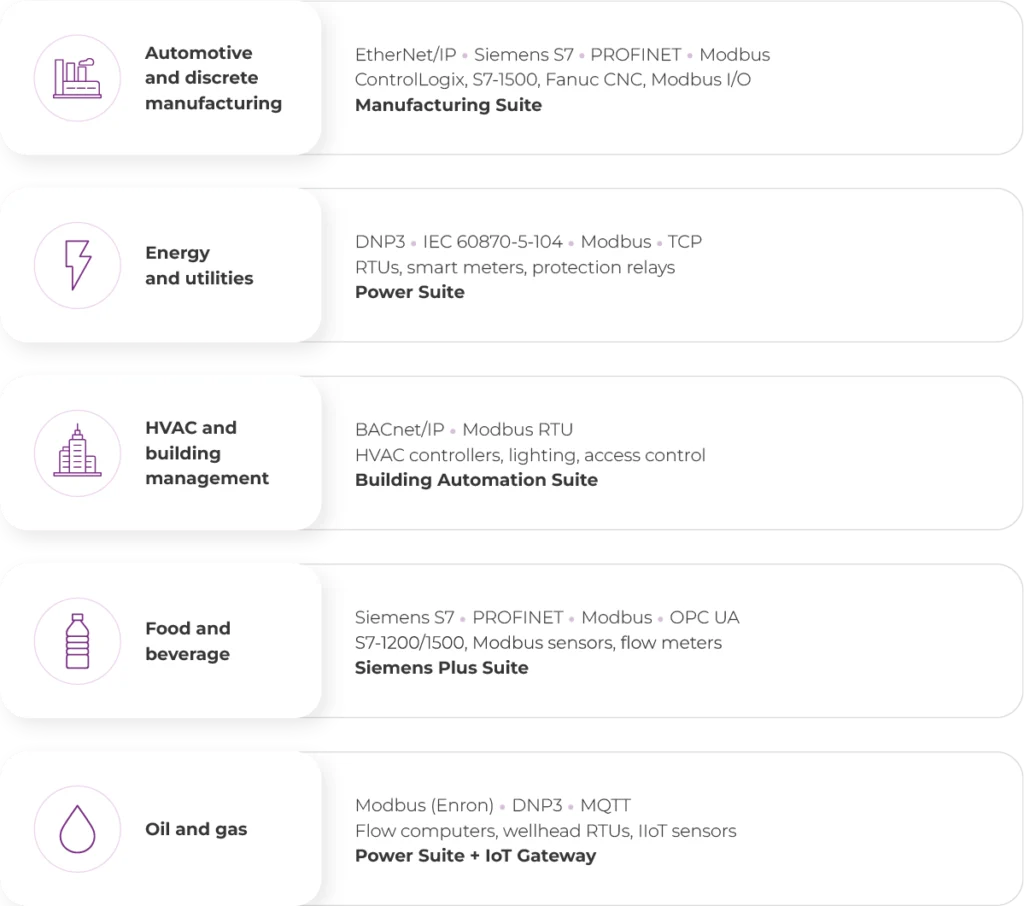
The table below maps common industry verticals to the Kepware drivers and Communication Suites most frequently deployed in each environment.
These drivers and suites are available both as perpetual licenses and through Kepware+ subscription, which adds centralized management, cloud provisioning, and flexible scaling. Kepware products are sold 'à la carte’ based on the different drivers and advanced plug-ins needed, which determine the price. Many Kepware products are sold with no limit on tags or devices, but some are sold on a tiered basis related to device or tag count.
Automotive and Discrete Manufacturing
Automotive production lines typically combine Siemens S7-1500 PLCs (line control), Allen-Bradley ControlLogix (cell control and robotics integration), and Modbus TCP I/O modules. Kepware Server collects OEE data (cycle times, reject counts, downtime events) from all three protocol families and delivers it as a unified OPC UA stream to MES and analytics platforms. The Manufacturing Suite or Kepware+ subscription covers all required drivers in a single licence.
Energy and Utilities (DNP3, IEC 61850)
Utility SCADA environments rely on DNP3 for substation communication, IEC 60870-5-104 for wide-area telecontrol, and increasingly on IEC 61850 for next-generation substation automation. Kepware’s Power Suite bundles DNP3 (with Secure Authentication v5), IEC 60870-5, and IEC 61850 drivers. Smart metering deployments often add Modbus TCP for meter data collection.
HVAC and Building Management (BACnet)
Building management systems use BACnet/IP for HVAC controllers, Modbus RTU for legacy actuators and sensors, and increasingly MQTT for IoT-enabled building devices. Kepware’s Building Automation Suite bundles BACnet/IP, Modbus, and U-CON drivers. Integrating BMS data into the same Kepware OPC UA namespace as production data enables unified energy management and facility monitoring dashboards.
Custom Driver and Kepware Extensions
The Plug-In Development Kit (PDK) enables custom drivers in .NET or C++ for unsupported devices.
When none of the 150+ standard Kepware drivers supports a specific device or proprietary protocol, Kepware provides several options for extending the platform.
Plug-In Development Kit (PDK) – When You Need a Custom Driver
The PDK is a development framework that allows system integrators and OEMs to create fully native Kepware Server drivers using .NET (C#) or C++ in Microsoft Visual Studio. A PDK-built driver operates identically to any factory-shipped Kepware driver: it appears in the channel creation wizard, supports the standard channel → device → tag hierarchy, and exposes tags through OPC UA, OPC DA, MQTT, and REST interfaces.
The PDK is typically required when connecting to proprietary serial protocols used by older laboratory instruments, custom PLC-like devices from niche OEMs, or specialised industrial equipment without standard communication interfaces. Certified Kepware partners like TT PSC can both supply your subscription and develop custom PDK drivers in-house, giving you a single point of contact from licensing through bespoke driver delivery.
Universal Device Driver (UDD) – No Programming Required
For simpler protocol adaptations, Kepware’s User Configurable (U-CON) driver and the Universal Device Driver (UDD) allow engineers to define custom serial or TCP/IP communication protocols using a configuration-based approach. You define the message structure (header, payload, checksum), parsing rules, and response format through the Kepware configuration interface. This approach is suitable for devices with straightforward request-response protocols where the overhead of a full PDK development project is not justified.
V-Code and TEK Drivers – Legacy Formats
Older Kepware installations may include drivers built using the legacy V-Code or TEK driver frameworks. These formats predate the current PDK and are no longer actively developed. Kepware recommends migrating V-Code/TEK drivers to PDK-based implementations when upgrading to current Kepware Server versions, as the PDK framework provides better performance, security, and compatibility with Kepware+ Manager remote configuration capabilities.
Kepware+ Enterprise Subscription That Eliminates Driver Complexity
Kepware+ bundles all drivers, plug-ins, and the SaaS management plane into one annual subscription.
The traditional Kepware licensing model – where each driver or Communication Suite is purchased separately works well for single-protocol projects. However, as production environments scale and heterogeneous device landscapes grow across multiple sites, managing dozens of individual driver licences becomes an administrative burden. Kepware+ solves this problem at its root.
How Kepware+ Simplifies Driver Licensing
With a Kepware+ subscription, an organisation receives access to every available Kepware driver and plug-in under a single licence ID. There is no need to audit which protocols are deployed at each site, no risk of discovering an unlicensed driver mid-commissioning, and no procurement delays when a new device type appears on the plant floor. If Kepware Server supports it, the Kepware+ licence covers it from Siemens S7 and Allen-Bradley through MQTT, Sparkplug B, BACnet, DNP3, and every niche protocol in between. The subscription also includes automatic access to all new drivers and updates released during the subscription term. Support and maintenance are bundled by default, so there is no separate renewal process.
Centralised Management with Kepware+ Manager
Every Kepware+ subscription includes access to Kepware+ Manager, a secure SaaS platform for remotely viewing, configuring, and managing all on‑premises Kepware Server and Kepware Edge instances from a single interface. Acting as a central data source for configuration and deployment status, the platform allows administrators to quickly find and manage channels, devices, tags, and gateway settings without on‑site intervention.
Teams and people responsible for OT operations can import and export complete project configurations between servers to enable standardised multi‑site deployments, maintain centralised project backups with one‑click restore, and monitor a version dashboard that tracks the software version of every Kepware instance. Kepware+ Manager also provides detailed audit logs that capture every configuration change with user identity and timestamp, helping organisations demonstrate compliance with IEC 62443, NIS2 directives, and internal change‑management policies.
Enhanced Cybersecurity Posture
Kepware+ directly strengthens an organisation’s OT cybersecurity posture across its industrial software applications. The subscription model ensures that every deployment is always eligible for the latest security patches, eliminating the common risk of running outdated, unpatched Kepware versions due to lapsed support agreements. Kepware+ Manager provides centralised visibility, enabling security teams to identify non‑compliant or outdated installations of critical software applications across the entire enterprise from a single dashboard.
The platform uses TLS‑encrypted communication between the SaaS control plane and on‑premises edge agents, with Microsoft Entra ID-based identity management (formerly Azure Active Directory), certificate‑based authentication, and role‑based access control aligned with the principle of least privilege. Kepware+ Manager does not transmit or store any proprietary process telemetry data; it operates strictly as a secure command‑and‑control channel for configuration management of distributed Kepware software applications.
When Kepware+ Makes Sense
Kepware+ is the cost‑effective choice for organisations operating more than a handful of Kepware instances, managing multi‑vendor device environments across multiple sites, or facing regulatory pressure to standardise and secure their OT connectivity layer. The subscription model shifts Kepware from a per‑driver capital expense to a predictable annual operational expense – simplifying budgeting and eliminating procurement friction as projects scale.
For organisations beginning their IIoT journey or expanding existing Kepware deployments, the Kepware+ subscription is the fastest path to full protocol coverage with enterprise‑grade security and management built in.
Troubleshooting Kepware Driver Connections
Kepware Server’s Event Log, Statistics View, and Quick Client isolate communication issues without external tools.
Even with careful configuration, communication issues arise. The following table summarises the most common failure modes, their root causes, and recommended solutions.
| Problem | Solution |
|---|---|
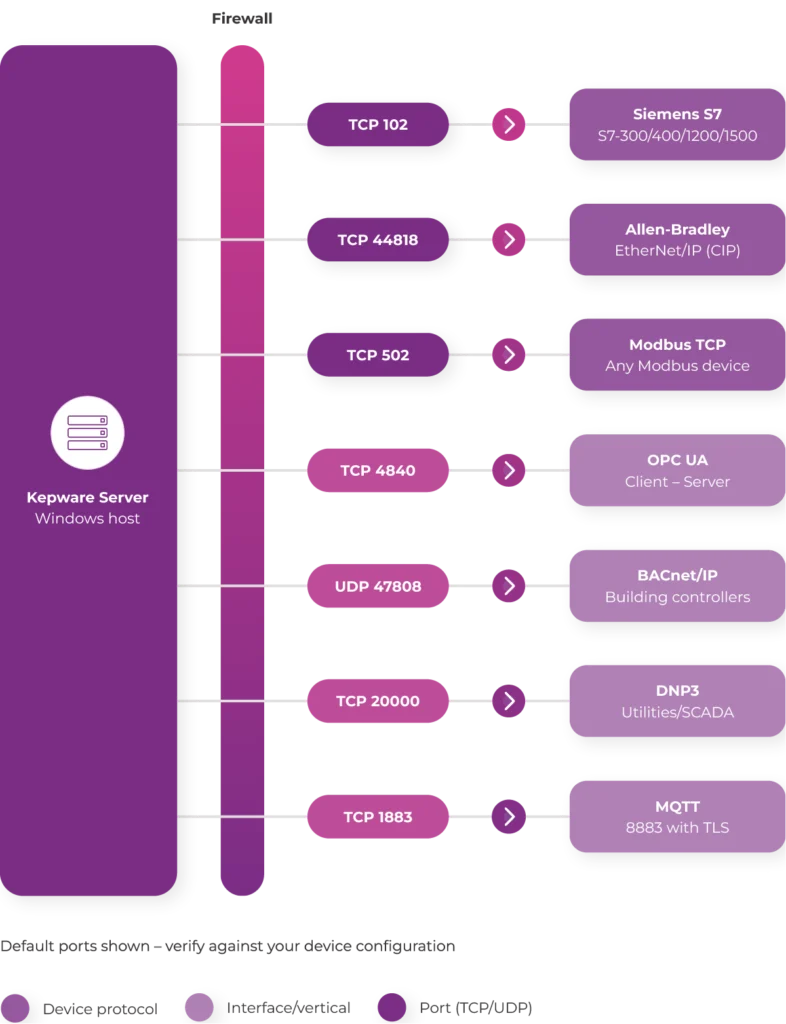
| “Unable to connect to device” | Ping device from Kepware host; verify firewall rules for driver port (102 for S7, 44818 for AB, 502 for Modbus) |
| Tags reading “Bad” quality | Check driver help (F1) for correct address syntax; verify data type matches device register |
| Intermittent timeouts | Increase request timeout and retry count; add 120Ω termination resistors on RS-485 |
| Slow scan rates | Enable block reads; review channel-level diagnostics for request timing and queue depth |
| Driver not selectable in channel wizard | Open licence utility (system tray); verify licence key; activate via My Kepware portal |
| Tags stuck at initial value (no updates) | Reduce scan rate; disable cache-first option; check device-side polling permissions |
| Connection drops after PLC restart | Enable auto-reconnect in device properties; set reconnect interval (default 3s) |
| OPC UA client cannot browse tags | Move client cert to “trusted” folder; match security policy (Basic256Sha256) |
| Modbus “Illegal Data Address” error | Toggle addressing convention in driver settings; verify register map with device documentation |
| High CPU usage on Kepware Server host | Increase scan interval; use demand-based polling; reduce Event Log verbosity |
The Kepware Server Event Log is the single most valuable diagnostic tool and should be the first page engineers consult when troubleshooting communication issues. It records every connection attempt, timeout, protocol error, and configuration change with precise timestamps. By filtering the Event Log page by channel or device, issues can be quickly isolated. Common error codes include STS (status) and EXTSTS (extended status) values for Allen‑Bradley drivers, as well as S7 error classes for Siemens drivers; these should be cross‑referenced with the relevant driver help documentation pages to identify the exact root cause and recommended remediation steps.
FAQ (Frequently Asked Questions About Kepware Drivers)
Below are the 13 most common questions from automation engineers and production managers about Kepware drivers.
Kepware Server offers over 150 certified communication drivers covering virtually every industrial protocol and device family – from legacy serial PLCs to modern IIoT/cloud platforms. The full list is available in the master protocol table above.
Customer Support and Resources
Kepware+ subscribers receive bundled support, updates, and Kepware+ Manager as part of their subscription.
Through a dedicated support portal, users can access documentation, tutorials, and FAQs designed to simplify configuration, management, and troubleshooting. Customers can log into their My Kepware account for personalised resources or contact Kepware’s Technical Support team for assistance with installation, migration, configuration, upgrades, licence management, and troubleshooting.
The Support and Maintenance Programme is available in one‑year, two‑year, or three‑year terms for perpetual licence holders. Kepware+ subscribers receive all support, maintenance, and product upgrades automatically with no separate renewal process required.
Need help configuring Kepware drivers for your specific environment?
A Kepware+ subscription through TT PSC is more than a licence transaction. It is the starting point for a structured engagement backed by over a decade of hands-on Kepware experience across 15+ countries:
- Architecture review and scoping from day one, so the subscription is sized correctly for your environment
- Secure configuration and deployment of Kepware Server, Kepware Edge, and Kepware+ Manager
- Multi-site rollout coordination for organisations operating across several plants or regions
- Long-term OT connectivity support as devices, protocols, and compliance requirements evolve
- End-to-end project delivery, from single-site installations to global enterprise rollouts
As a certified Kepware+ partner and OT/IT system integrator, TT PSC covers the full lifecycle – from initial design through to ongoing operations, including comprehensive Kepware licensing and implementation services to ensure seamless deployment and long-term performance.